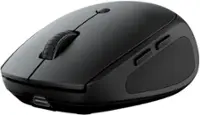
Logitech - M170 Wireless Compact Optical Ambidextrous Mouse - Wireless - Black
Color
Black- Logitech - K585 Full-size Wireless Scissor Keyboard for Windows, Mac, Chrome, Android with Build-in Cradle for device - Graphite$44.99The price was $59.94
More Buying Options
Related Item

Specifications
- Lighting TypeNoneMaximum Sensitivity1000 dots per inchNumber of Buttons (Total)3Connection TypeWireless
- Key Specs
- Lighting Type: None
- Maximum Sensitivity: 1000 dots per inch (Mouse sensitivity is measured in dots per inch (DPI). The higher the DPI, the more sensitive the mouse is and may be more useful for high-density pixel screens. Lower DPI typically means more precision and accuracy in mouse movement.)
- Number of Buttons (Total): 3
- Connection Type: Wireless
- General
- Brand: Logitech
- Model Number: 910-004940
- Product Name: M170 Wireless Compact Optical Ambidextrous Mouse
- Color: Black
- System Requirements: Windows 10, 11 or later, Linux, Chrome OS, macOS 10.5 or later (The software that a product must have for it to be able to integrate with another product.)
- Features
- Mouse Type: Compact
- Lighting Type: None
- Performance
- Mouse Operation: Scroll wheel, Button(s)
- Mouse Grip Style: Standard (In comparison to many palm and claw grips, ergonomic grip mice are designed for a specific handedness and put the hand and wrist in a position to promote comfort. Customizable grips feature buttons/keys that can be configured to perform specific actions and may also have customizable calibration and sensitivity settings.)
- Handedness: Ambidextrous
- Tracking Method: Optical (There are several types of computer mice, optical and laser being among the most common. Optical mice detect less detail and provide more precise and accurate movement. Laser mice detect more detail and can be used on a wider variety of surfaces, but are more sensitive to small movements.)
- Maximum Sensitivity: 1000 dots per inch (Mouse sensitivity is measured in dots per inch (DPI). The higher the DPI, the more sensitive the mouse is and may be more useful for high-density pixel screens. Lower DPI typically means more precision and accuracy in mouse movement.)
- Minimum Sensitivity: 1000 dots per inch (Mouse sensitivity is measured in dots per inch (DPI). The higher the DPI, the more sensitive the mouse is. Lower DPI typically means more precision and accuracy in mouse movement, but higher DPI may be useful for high-density pixel screens.)
- Number of Buttons (Total): 3
- Number of Thumb Buttons: 0
- Number of Programmable Buttons: 0
- Adjustable Weight: false
- Connectivity
- Connection Type: Wireless
- Wireless Connectivity: Radio Frequency (RF) (The manner in which a device sends data to another device over a short distance without the use of wires or cables.)
- Maximum Wireless Range: 33 feet
- Operating System Compatibility: Windows, Mac, Chrome, Linux
- Plug and Play Operation: true
- Number of Devices Connectable Simultaneously: 1
- Power
- Mouse Power Source: Battery-powered
- On/Off Switch: true
- Rechargeable Battery (Mouse): false
- Battery Size: AA (The battery size required for operation.)
- Number of Batteries Required: 1
- Batteries Included: true (Indicates whether the product comes with the required batteries for its operation.)
- Included
- Mouse Pad Included: false
- Dimensions
- Product Height: 1.4 inches (The out of box height of the item. Height is measured as the vertical distance from the bottom of the item to the top as it would be primarily used or placed.)
- Product Length: 4.7 inches (The out of box length of the item. Length is measured as the longest dimension of the item.)
- Product Width: 2.4 inches (The out of box width of the item. Width is measured as the horizontal distance from one side of the item to the other as it would be primarily used or placed.)
- Product Weight: 70.5 grams (The out of box weight of the item.)
- Warranty
- Warranty - Parts: 1 year
- Warranty - Labor: None
- Other
- UPC: 097855124180
NOW IS WIRELESS. With Logitech M170 Wireless Mouse, choose the reliability of a cord with the convenience of wireless – and a 33-foot range – thanks to Logitech Advanced 2.4 GHz wireless technology. This affordable mouse works for up to 12 months on a single AA battery. Set up is simple – just plug the tiny wireless receiver into a USB slot. There's no hassle with pairing or software installation, and M170 is compatible with Windows, Mac and Chrome.
- Plug-and-play connection: Connect in 3 seconds to your computer via a strong, reliable USB receiver that plugs into your computer’s USB port.¹
- Durable and compatible: You get the high quality and reliability that's made Logitech the global computer mouse leader, at a price you can afford plus a three-year limited hardware warranty; this mouse is broadly compatible (Windows, macOS, Chrome OS and Linux).
- Power-saving features: 12-month battery life and auto sleep help you go longer between AA battery changes.²
- Comfortable and mobile: The ambidextrous shape and ability to reassign right and left buttons makes it ideal for left- or right-handed individuals.
- Small and portable: The small size and smooth cursor control make it great for tight workspaces and busy desks.
- More sustainable: Plastic parts in M170 include certified post consumer recycled plastic (minimum 59% for Black/Gray).³
- Product carbon footprint: The carbon footprint of this product is 4.05 kg CO2e.
- Plug-and-play connection: Connect in 3 seconds to your computer via a strong, reliable USB receiver that plugs into your computer’s USB port.¹
- Durable and compatible: You get the high quality and reliability that's made Logitech the global computer mouse leader, at a price you can afford plus a three-year limited hardware warranty; this mouse is broadly compatible (Windows, macOS, Chrome OS and Linux).
- Power-saving features: 12-month battery life and auto sleep help you go longer between AA battery changes.²
- Comfortable and mobile: The ambidextrous shape and ability to reassign right and left buttons makes it ideal for left- or right-handed individuals.
- Small and portable: The small size and smooth cursor control make it great for tight workspaces and busy desks.
- More sustainable: Plastic parts in M170 include certified post consumer recycled plastic (minimum 59% for Black/Gray).³
- Product carbon footprint: The carbon footprint of this product is 4.05 kg CO2e.
- Plug-and-play connection: Connect in 3 seconds to your computer via a strong, reliable USB receiver that plugs into your computer’s USB port.¹
- Durable and compatible: You get the high quality and reliability that's made Logitech the global computer mouse leader, at a price you can afford plus a three-year limited hardware warranty; this mouse is broadly compatible (Windows, macOS, Chrome OS and Linux).
- Power-saving features: 12-month battery life and auto sleep help you go longer between AA battery changes.²
- Comfortable and mobile: The ambidextrous shape and ability to reassign right and left buttons makes it ideal for left- or right-handed individuals.
- Small and portable: The small size and smooth cursor control make it great for tight workspaces and busy desks.
- More sustainable: Plastic parts in M170 include certified post consumer recycled plastic (minimum 59% for Black/Gray).³
- Product carbon footprint: The carbon footprint of this product is 4.05 kg CO2e.
Whats Included
- Logitech M170
- USB wireless receiver
- User documentation
- Logitech M170
- USB wireless receiver
- User documentation
- Logitech M170
- USB wireless receiver
- User documentation
Q: What is the maximum range for the wireless connection?
A: The maximum wireless range for this mouse is 33 feet.
Q: Are batteries included with the purchase of this mouse?
A: Yes, batteries are included with this mouse.
Q: How many buttons does this mouse have in total?
A: This mouse has a total of three buttons.
Q: Does this mouse have an on or off switch?
A: Yes, this mouse has an on or off switch.
Q: Does this mouse have plug and play operation?
A: Yes, this mouse features plug and play operation.
Q: Is this mouse compatible with the macOS operating system?
A: Yes, this mouse is compatible with macOS 10.5 or later.
Q: Can this mouse be used by both right and left-handed people?
A: Yes, this mouse has an ambidextrous design.
Q: Does this work on Macbook Air?
A: Yes. I have a MacBook Air and I had it set-up in 1 minute and working.
Compare similar products
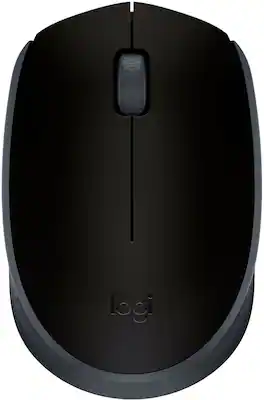
NOW IS WIRELESS. With Logitech M170 Wireless Mouse, choose the reliability of a cord with the convenience of wireless – and a 33-foot range – thanks to Logitech Advanced 2.4 GHz wireless technology. This affordable mouse works for up to 12 months on a single AA battery. Set up is simple – just plug the tiny wireless receiver into a USB slot. There's no hassle with pairing or software installation, and M170 is compatible with Windows, Mac and Chrome.

Eliminate the most common computer mouse issue—the cord. With the Best Buy Essentials Wireless Mouse with USB Receiver, you can navigate the web with speed and accuracy. Compatible with both Windows and Mac computers, simply insert the included nano receiver into one of your computer’s USB ports to wirelessly connect the mouse. It has just 3 buttons and an ambidextrous design for simple control. Optical technology detects when the mouse moves to deliver an accurate 1600 DPI response. We also included a AA battery, so you won’t have to worry about keeping the mouse powered until the LED indicator starts to blink. Let us improve your computer navigation by going wireless with this Best Buy-backed mouse.
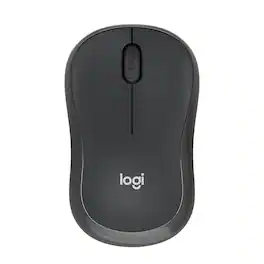
With the same click feel and 90% noise reduction compared to Logitech M170 classic mice, M220 SILENT offers a quiet experience for yourself and those around you. It has a long-lasting up to 18-month battery life with auto-sleep and a powerful 33 ft wireless range with 128-bit encryption between the mouse and the receiver. Plus, its small size is perfect to toss in a bag and go. Just plug the tiny USB receiver and it works with Windows, Mac, Chrome OS or Linux. Finally, the Logitech Advanced Optical Tracking is designed for smooth and precise moves on almost any surface.

Discover the reliable Logitech M196 Bluetooth Wireless Mouse and declutter your workspace. This convenient portable mouse pairs to your laptop or tablet in seconds via Bluetooth—no dongle or port required. Enjoy up to 12-month battery life and auto sleep feature to help you go longer between AA battery changes. Small enough to toss in a bag, this comfortable Bluetooth travel mouse has an ambidextrous design that guides either your right or left hand into a natural position. The Logitech M196 Wireless Bluetooth Mouse is made to last with recycled plastic.
| Pros for Logitech - M170 Wireless Compact Optical Ambidextrous Mouse - Wireless - Black | |||
|---|---|---|---|
| Overall Performance, Ease of Use, Size, Connectivity, Ergonomics | Ease of use, Overall Performance, Price, Size, Wireless | Ease of use, Overall Performance, Size, Price, Noise Level | Overall Performance, Connectivity, Ease of Use, Size, Weight |
| Cons for Logitech - M170 Wireless Compact Optical Ambidextrous Mouse - Wireless - Black | |||
| Noise Level, Compatibility, Missing Part, Color Accuracy | Click Sound, Grip | Lag | Noise Level |
Specs

- SteelSeries - Arctis Nova Pro Wireless Multi Gaming Headset for PC, PS5, PS4, Switch - White$299.99The price was $379.99
- KontrolFreek - GamerPack Thumbsticks, Xbox/Xbox Series X - Red$16.99The price was $21.99


Reviews
Customers are saying
Customers recognize the M170 Wireless Mouse for its overall performance and ease of use. Many appreciate its compact size and ergonomic design, noting it fits comfortably in the hand. The mouse is also praised for its reliable connectivity and long battery life. However, some customers have reported compatibility issues and concerns about the click sound.
- Overall Performance (1076)
- Ease of Use (453)
- Size (168)
- Compatibility (6)
- Missing Part (5)
- Noise Level (5)
Customer Images
The vast majority of our reviews come from verified purchases. Reviews from customers may include My Best Buy members, employees, and Tech Insider Network members (as tagged). Select reviewers may receive discounted products, promotional considerations or entries into drawings for honest, helpful reviews.
- Rated 5 out of 5 stars
Best wireless mouse for using long hours
I found this mouse easy to use. Fits very easily in my hand and rolls around on my mouse pad smoothly. The mouse installed instaly and the computer picks it up as soon as it is switched on.
Nicegirl Posted
- Rated 4 out of 5 stars
Logitech M170
this product is very good , but you have to use it over a darker color pad to avoid any reflection. other than that it's perfect. Moreso, this is not for gaming just for regular school work
cram Posted
- Rated 5 out of 5 stars
the Mouse works great
The wireless Mouse works perfect. and very easy to use. all you have to do is put the USB it comes with and in seconds it is ready to use.
1111111111111a Posted
Explore tech essentials Sponsored
- $239.99The price was $647.99
- $37.99The price was $59.99