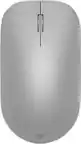
Logitech - M325s Wireless Optical Compact Ambidextrous Mouse - Wireless - Pale Gray
Logitech - M325s Wireless Optical Compact Ambidextrous Mouse - Wireless - Pale Gray
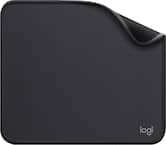
- Logitech - Mouse Pad Studio Series with Spill-Resistant Surface (Medium) - Graphite$8.99The price was $9.99
More Buying Options
Related Item

Specifications
- Lighting TypeNoneMaximum Sensitivity1000 dots per inchNumber of Buttons (Total)5Connection TypeWireless
- Key Specs
- Lighting Type: None
- Maximum Sensitivity: 1000 dots per inch (Mouse sensitivity is measured in dots per inch (DPI). The higher the DPI, the more sensitive the mouse is and may be more useful for high-density pixel screens. Lower DPI typically means more precision and accuracy in mouse movement.)
- Number of Buttons (Total): 5
- Connection Type: Wireless
- General
- Brand: Logitech
- Model Number: 910-007522
- Product Name: M325s Wireless Optical Compact Ambidextrous Mouse
- Color: Pale Gray
- System Requirements: Available USB Port , Windows® 10, 11 or later , macOS 10.5 or later , ChromeOS , Certified Works With Chromebook™ ? , Linux® kernel 2.6+ or later , Internet access required to download optional customization app Logi Options+. (The software that a product must have for it to be able to integrate with another product.)
- Features
- Mouse Type: Compact
- Lighting Type: None
- Performance
- Mouse Operation: Button(s), Scroll wheel, Tilt wheel
- Mouse Grip Style: Standard (In comparison to many palm and claw grips, ergonomic grip mice are designed for a specific handedness and put the hand and wrist in a position to promote comfort. Customizable grips feature buttons/keys that can be configured to perform specific actions and may also have customizable calibration and sensitivity settings.)
- Handedness: Ambidextrous
- Tracking Method: Optical (There are several types of computer mice, optical and laser being among the most common. Optical mice detect less detail and provide more precise and accurate movement. Laser mice detect more detail and can be used on a wider variety of surfaces, but are more sensitive to small movements.)
- Maximum Sensitivity: 1000 dots per inch (Mouse sensitivity is measured in dots per inch (DPI). The higher the DPI, the more sensitive the mouse is and may be more useful for high-density pixel screens. Lower DPI typically means more precision and accuracy in mouse movement.)
- Minimum Sensitivity: 1000 dots per inch (Mouse sensitivity is measured in dots per inch (DPI). The higher the DPI, the more sensitive the mouse is. Lower DPI typically means more precision and accuracy in mouse movement, but higher DPI may be useful for high-density pixel screens.)
- Number of Buttons (Total): 5
- Number of Thumb Buttons: 0
- Number of Programmable Buttons: 5
- Adjustable Weight: false
- Connectivity
- Connection Type: Wireless
- Wireless Connectivity: Radio Frequency (RF) (The manner in which a device sends data to another device over a short distance without the use of wires or cables.)
- Maximum Wireless Range: 33 feet
- Operating System Compatibility: Windows, Mac, Chrome, Linux
- Plug and Play Operation: true
- Power
- Mouse Power Source: Battery-powered
- On/Off Switch: true
- Rechargeable Battery (Mouse): false
- Battery Size: AA (The battery size required for operation.)
- Number of Batteries Required: 1
- Batteries Included: true (Indicates whether the product comes with the required batteries for its operation.)
- Included
- Mouse Pad Included: false
- Dimensions
- Product Height: 1.54 inches (The out of box height of the item. Height is measured as the vertical distance from the bottom of the item to the top as it would be primarily used or placed.)
- Product Length: 3.73 inches (The out of box length of the item. Length is measured as the longest dimension of the item.)
- Product Width: 2.24 inches (The out of box width of the item. Width is measured as the horizontal distance from one side of the item to the other as it would be primarily used or placed.)
- Product Weight: 93 grams (The out of box weight of the item.)
- Warranty
- Warranty - Parts: 3-Year
- Warranty - Labor: None
- Other
- UPC: 097855202840
The Logitech M325s offers a great blend of comfort and control, with micro-precise scrolling designed for web use. Its contoured shape and textured grips keep your hand comfortable, even during long sessions. With up to 18 months of battery life, it's a reliable, hassle-free companion for everyday productivity.
- Small but mighty wireless mouse: M325S is comfy, compact, and wireless—great on the go. Ambidextrous design with customizable buttons via Logi Options+ app.¹
- Smooth scrolling and customizable scroll wheel: Scroll with speed and precision using the tilt wheel—customizable for horizontal scroll, navigation, and more via Logi Options+ app.¹
- Up to 18 months battery life: Built to the high standards of a global leader, the M325S is durable and lasts up to 18 months with power-saving tech. ²
- Compatibility: M325S is compatible with most OS, including Windows, macOS, Linux, and certified Works with Chromebook. Simply plug in the USB receiver for a strong 10m connection.³ ⁴
Whats Included
- Mouse
- USB receiver
- 1 AA battery (pre-installed)
- User documentation
Disclaimers
- ¹ Customization of the buttons via Logi Options+ is not possible on Linux.
- ² Battery life may vary based on user and computing conditions.
- ³ This product has been certified to meet Google's compatibility standards. Google is not responsible for the operation of this product or its compliance with safety requirements. Chromebook and the "Works With Chromebook" badge are trademarks of Google LLC.
- ⁴ Wireless range varies with environment and setup.
- ⁵ Excludes plastic in printed wiring assembly, receiver, and packaging.
Q: Does the M325s work with the unifying receiver?
A: The M325s does work with a Logitech unifying receiver. I used the unifying software from Logitech to pair it. However, the mouse does not come with a unifying receiver. It comes with a Logi receiver, which only works with the M325s mouse.
A: You need a Logitech universal USB adapter. This product adapter only works with the mouse.
A: Hey! The M325s mouse is compatible with Chromebook.
A: You open up the battery compartment and take out the USB plugin held inside. Take that small pulgin and plug it in to on of your computers USB ports. Make sure your mouse has a battery in it and switch the mouse to on. It should automatically connect to your computer.
A: I am not sure if this is a question, but I will try to help you so you have the correct answer. I personally own this same mouse in many colors. You asked >>I'd leave a review but can't figure out how and I'm not spending my life looking.<< All you need to do is go to your "Purchases", click on your purchases and next to the item ordered it says "Write a Review" All wireless mice come with the dongle in the battery compartment. This is how the mouse communicates with the computer. By the manufacturer placing the dongle in this area in the packaging, it also shows you that you can store the dongle in this compartment if you use a laptop and have to travel with the laptop. It mentions this on the back of the box and in the pamphlet. All you need to do is open the compartment, pull out the dongle and plug it into your computer's USB port. It is plug and play with no software install needed. Hope that helps.
Q: Is the receiver for this mouse a usb-c?
A: I have this Logitech M325s mouse in many colors, including Graphite like yours. The receiver for this mouse is a USB-A. You can buy a converter dongle if you need a USB-C.
Q: Can I use on Apple computer
A: Yes, the Logitech M325s can be used with either Windows or Apple Operating systems. I have used mine on both with no issues.
Q: can alogitehc wireless mouse be programed to use the right click
A: Yes, I own this exact Logitech M325s mouse in Lilac and I can confirm that this mouse can be used with either button as the main button. I have done this change myself. To do this for any mouse - go to your Start button on your computer type in "Control Panel" - then click "Mouse" - in these settings on your computer you can setup your mouse very easily to be left click or right click and you can change it back and forth as often as you like. Your computer will remember these settings each time you reboot. You only need to do it once no matter how many different mice you use.
Compare similar products

The Logitech M325s offers a great blend of comfort and control, with micro-precise scrolling designed for web use. Its contoured shape and textured grips keep your hand comfortable, even during long sessions. With up to 18 months of battery life, it's a reliable, hassle-free companion for everyday productivity.

The Design Collection Limited Edition mice mood-boosting designs bring a vibrant new look to your desk setup. Choose between different fun styles. It’s small, comfortable, super responsive, and completely wireless. Get total freedom with 10 m of wireless range, and work worry-free for 12 months on a single pre-installed battery. With smooth, line by line scrolling and precise cursor control for easier navigation at home or at work. The compact design perfectly fit users with smaller hands and kids—making it a great option for homeschooling.
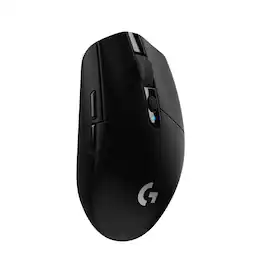
G305 features the next-gen HERO sensor with 12,000 DPI sensitivity and LIGHTSPEED wireless 1 ms performance. It’s long-lasting with 250 gaming hours from one AA battery (an indicator light reminds you before you need a new AA), ultra-portable with built-in nano receiver storage, lightweight weighing in at 99 grams, and ready to game with 6 programmable buttons. G305 is the LIGHTSPEED wireless mouse for all.
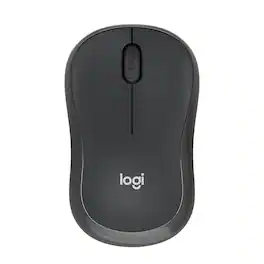
With the same click feel and 90% noise reduction compared to Logitech M170 classic mice, M220 SILENT offers a quiet experience for yourself and those around you. It has a long-lasting up to 18-month battery life with auto-sleep and a powerful 33 ft wireless range with 128-bit encryption between the mouse and the receiver. Plus, its small size is perfect to toss in a bag and go. Just plug the tiny USB receiver and it works with Windows, Mac, Chrome OS or Linux. Finally, the Logitech Advanced Optical Tracking is designed for smooth and precise moves on almost any surface.
| Pros for Logitech - M325s Wireless Optical Compact Ambidextrous Mouse - Wireless - Pale Gray | |||
|---|---|---|---|
| Overall Performance, Size, Color, Ease of Use, Ergonomics | Ease of use, Overall Performance, Size, Color, Design | Overall Performance, Ease of use, Price, Weight, Battery Life | Ease of use, Overall Performance, Size, Price, Noise Level |
| Cons for Logitech - M325s Wireless Optical Compact Ambidextrous Mouse - Wireless - Pale Gray | |||
| Surface Compatibility, Noise Level | Lag, Scroll Wheel, On/Off Switch | Lag, Button Placement, Software | Lag |
Specs





Reviews
Customers are saying
Customers highly value the M325s Wireless Optical Compact Ambidextrous Mouse for its overall performance and ease of use. Many appreciate its ideal size, comfortable ergonomics, appealing color, and simple connectivity. While the mouse boasts many positives, some customers have noted minor issues with surface compatibility, noise level, and button layout.
Customer Images
The vast majority of our reviews come from verified purchases. Reviews from customers may include My Best Buy members, employees, and Tech Insider Network members (as tagged). Select reviewers may receive discounted products, promotional considerations or entries into drawings for honest, helpful reviews.
- Rated 5 out of 5 stars
Grab you one!
I’ve been using the Logitech M325s every day and it has been nothing but smooth and reliable. The scroll wheel is precise, the connection is instant, and it fits comfortably in my hand without feeling bulky. Battery life lasts forever too. If you need a dependable everyday mouse, this is the one.
This review is from Logitech - M325s Wireless Optical Compact Ambidextrous Mouse - Wireless - Darker Black
ElectronicLover128 Posted
- Rated 5 out of 5 stars
This mouse is a perfect fit for an arthritic hand.
The Logitech M325s is my go to mouse. I have purchased more than 20 over the last 15 years. The problem is that I needed to purchase that many. I have had to deem these as disposable computer mice now. They have all failed. I tried writing to Logitech with my concerns, showing all the mice lined up and receipts showing I only purchased the last one 6 months prior before it failed. I offered to send them all back so that they can see what has happened with each. They didn't care. Once again, I have brand loyalty to a product that continues to fail. Why? Because I have bad arthritis in my hands and this is the only mouse I can hold comfortably through 12 hours of work a day. So I either use another mouse and have hand pain or I have to pay to replace these every 6-12 months. Which would you decide? I do appreciate the fact this mouse comes in so many different color options. This means I can keep track of which ones fail by the color. If they were all black, I wouldn't be able to tell them apart. I have had this mouse two weeks and it is going strong. I will come back and edit this review with how long it lasts. I won't ding the rating on this specific mouse based on what happened with previous Logitech M325s mice. I will wait until this one fails and them come back and edit the review. Until then, stay tuned.
This review is from Logitech - M325s Wireless Optical Compact Ambidextrous Mouse - Wireless - Lilac
daxd Posted
- Rated 5 out of 5 stars
Cheap & Fast
Delivery was FAST!! Plug and play wireless mouse, easy to set up. Working properly so far. Absolutely affordable!
This review is from Logitech - M325s Wireless Optical Compact Ambidextrous Mouse - Wireless - Lilac
PaulineA Posted