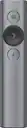
Logitech - Spotlight Presentation Remote with 100 ft Range and Quick Charging - Slate
Logitech - Spotlight Presentation Remote with 100 ft Range and Quick Charging - Slate
- Logitech - R800 Professional Presenter - BlackTech Fest Deal$49.99The price was $54.99

More Buying Options
About This Item
- General
- Brand: Logitech
- Model Number: 910-004654
- Product Name: Spotlight Presentation Remote with 100 ft Range and Quick Charging
- Color: Slate
- Warranty
- Warranty - Parts: 1 year
- Warranty - Labor: None
- Other
- Product Width: 1.1 inches (The out of box width of the item. Width is measured as the horizontal distance from one side of the item to the other as it would be primarily used or placed.)
- Product Height: 5.2 inches (The out of box height of the item. Height is measured as the vertical distance from the bottom of the item to the top as it would be primarily used or placed.)
- Product Length: 0.5 inches (The out of box length of the item. Length is measured as the longest dimension of the item.)
- Product Weight: 1.7 ounces (The out of box weight of the item.)
- Batteries Included: true (Indicates whether the product comes with the required batteries for its operation.)
- Battery Chemistry: Lithium-polymer
- Battery Size: Not Applicable (The battery size required for operation.)
- Number of Batteries Required: 1
- Plug And Play Operation: true (The product can work when first used or connected, without reconfiguration or adjustment by the user.)
- System Requirements: Windows 7 or later, macOS X 10.10 or later, Android 5.0 or later, Chrome OS or Linux (The software that a product must have for it to be able to integrate with another product.)
- Computer Connectivity: Android, Chrome, Linux, Mac, Windows
- Handedness: Ambidextrous
- Compatible Software Programs: Microsoft PowerPoint, Apple Keynote, Adobe Acrobat Reader, Google Slides, Prezi
- Indoor Range: 100 feet
- Integrated Laser Pointer: true
- Integrated Mouse Functions: true
- Interface(s): Bluetooth, USB
- Number Of Buttons: 3
- Wireless Frequency: 2.4 gigahertz
- UPC: 097855127754
Meet Spotlight. A game-changing presentation remote. Spotlight allows you to simply navigate slides and interact with on-screen content from up to 100 feet away. The customizable timer sends vibration alerts directly to hand – and the advanced pointer system allows you to highlight and magnify areas of focus in pixel-perfect detail.
- Highlight and magnify on screen: Go beyond traditional laser pointing; set up your advanced presentation clicker with pointer that works in-person, virtually or a hybrid of both in Logi Options+ App.
- Mouse-like cursor control: Use the on-screen cursor to play and pause videos, open links, and enjoy a range of rich content interaction.
- Smart time management: Configure key timing milestones in Logi Options+ App and receive vibration alerts directly to Spotlight reminding you when it’s time to wrap up.
- Dual connectivity: Connect wirelessly to your computer via USB-A receiver or low energy Bluetooth Smart; a convenient, built-in dock stores the USB receiver into Spotlight when not in use.
- Universal compatibility: Spotlight is optimized to work with Windows, Mac OS and all leading presentation software including PowerPoint, Keynote, PDF, Google Slides, and Prezi.
- Personalized experience: Since you are the one in the spotlight when presenting, enhance and customize the effects to your needs in the Logi Options+ App.
- Highlight and magnify on screen: Go beyond traditional laser pointing; set up your advanced presentation clicker with pointer that works in-person, virtually or a hybrid of both in Logi Options+ App.
- Mouse-like cursor control: Use the on-screen cursor to play and pause videos, open links, and enjoy a range of rich content interaction.
- Smart time management: Configure key timing milestones in Logi Options+ App and receive vibration alerts directly to Spotlight reminding you when it’s time to wrap up.
- Dual connectivity: Connect wirelessly to your computer via USB-A receiver or low energy Bluetooth Smart; a convenient, built-in dock stores the USB receiver into Spotlight when not in use.
- Universal compatibility: Spotlight is optimized to work with Windows, Mac OS and all leading presentation software including PowerPoint, Keynote, PDF, Google Slides, and Prezi.
- Personalized experience: Since you are the one in the spotlight when presenting, enhance and customize the effects to your needs in the Logi Options+ App.
Whats Included
- Logitech Spotlight Presentation Remote
- Proprietary receiver
- User documentation
- Charging cable
- Pouch
- Logitech Spotlight Presentation Remote
- Proprietary receiver
- User documentation
- Charging cable
- Pouch
A: Bluetooth enabled for Macs. YES
A: Quick update to this one - there is now software called Logitech Sptlight Lite, which is made specifically for installing on laptops without admin permissions.
A: When you hold one of the buttons down, you get a mouse pointer and can move the mouse arrow.
A: 1. Open System Preference. 2. Click on “Security & Privacy” 3. Go to the “Privacy” tab. 4. From the menu on the left, click on “Screen Recording” 5. Check “LogiPresentation” on the right. 6. Now, quit the software and re-open it. The magnifier should work now.
Q: I am not able to zoom with my new Spotlight device. How do you zoom or attempt to zoom ?
A: MacOs Magnifying Desktop fix, go to System preferences Security and privacy Privacy Screen recording Give permission (Check the box) to Logi Presentation This worked for me, hope it helps
Q: Can this remote connect with a keynote presentation on an ipad?
A: Yes. It uses Bluetooth or you can put an adapter for HDMI too.
Q: What accessories go with this and does it come with a long life battery?
A: A leather sleeve, and the charging cable: USB -C on one end and USB-A on the other.. The USBC goes inside the pointer, the USB-A connects to any charger or your computer. One minute charge gives three hours of charge to the battery. It is a built-in rechargeable battery. If fully charged it apparently lasts up to three months.
Q: Does this presenter scroll like a mouse or just advance from screen to screen?
A: No, this presenter do not scroll like a mouse.
Reviews
Customers are saying
Customers appreciate the Spotlight Presentation Remote's ease of use, impressive range, and long battery life. Many also highlight the device's spotlight feature, sleek design, and compatibility with various systems. Positive feedback frequently mentions the convenient size and functionality. While some find the price point high, and others experienced minor software installation challenges, the overall user experience is largely positive.
Customer Images
The vast majority of our reviews come from verified purchases. Reviews from customers may include My Best Buy members, employees, and Tech Insider Network members (as tagged). Select reviewers may receive discounted products, promotional considerations or entries into drawings for honest, helpful reviews.
Compare similar products

Meet Spotlight. A game-changing presentation remote. Spotlight allows you to simply navigate slides and interact with on-screen content from up to 100 feet away. The customizable timer sends vibration alerts directly to hand – and the advanced pointer system allows you to highlight and magnify areas of focus in pixel-perfect detail.

Introducing the R500s, a plug-and-play presentation remote that allows you to navigate slides and laser point from up to 20 meters away. Deliver your presentation with ease and confidence thanks to the unmistakable three-button design and R500s' comfortable, secure fit in hand. The R500s is optimized for most devices and popular presentation software – and you can customize buttons, check battery life, and set an on-screen timer in the Logitech Presentation App.

Take your presentation to the next level with this wireless presenter that features a green laser pointer and intuitive slideshow controls for smooth navigation. The 2.4GHz wireless technology allows you to enjoy up to a 100' range, so you can move around the room and interact with your audience.
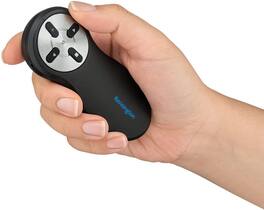
Present with confidence using the Kensington Wireless Presenter with Nano Receiver, SKU-K33271WW. Designed for professionals, this intuitive remote offers secure AES 128-bit encrypted wireless technology and a generous 65-foot range, ensuring reliable performance in any meeting room or lecture hall. Its ergonomic design and simple four-button layout allow seamless navigation through slides, screen blackout, and slideshow start functions without distraction. The compact nano receiver conveniently stores inside the battery compartment when not in use, making it easy to transport and reducing the risk of loss. Compatible with both Windows and Mac operating systems, this plug-and-play device requires no software installation—just connect and begin presenting instantly. With its secure connection, portability, and ease of use, the Kensington Wireless Presenter is the ideal tool for professionals who demand reliability and simplicity in their presentations
| Pros for Logitech - Spotlight Presentation Remote with 100 ft Range and Quick Charging - Slate | |||
|---|---|---|---|
| Ease of use, Range, Overall Performance, Spotlight Feature, Battery Life | Ease of use, Overall Performance, USB, Connectivity, Compatibility | Ease of use, Range, Overall Performance, Laser Pointer, Timer | There were no pros for this product— |
| Cons for Logitech - Spotlight Presentation Remote with 100 ft Range and Quick Charging - Slate | |||
| Price, Software | Laser Pointer | Price, Button Placement | There were no cons for this product— |