Customer Ratings & Reviews
- Model:
- ROC-11-901-AM
- |
- SKU:
- 5057510
Customer reviews
Rating 3.5 out of 5 stars with 2 reviews
(2 customer reviews)to a friend
Rated 5 out of 5 stars
Best Mouse to date!!
Posted .This reviewer received promo considerations or sweepstakes entry for writing a review.I was a big Razer fan and have gone through two Razer Naga's. Since they changed the style I decided to try this one out seeing how the side buttons are full customization. I prefer a claw grip to the mouse so the options to make it that way is amazing. If you like a bigger wider mouse then you can swap the sides out. Hands down, this is probably the best MMO gaming mouse on the market. I have been using it for three weeks now and I am glad i took the chance and purchase it.
This review is from ROCCAT - NYTH Laser Modular MMO Gaming Mouse - Black
I would recommend this to a friendRated 2 out of 5 stars
Disappointing
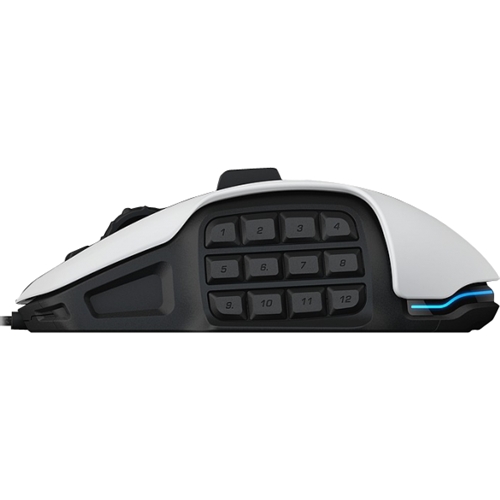
Posted .This reviewer received promo considerations or sweepstakes entry for writing a review.I have previously owned two Razer - Naga Chroma mouses. I decided to go with this mouse as a change. After 5 months using this mouse I will never buy another Roccat product. The biggest problem is the fact that the mouse will jump your cursor across the screen when you pick it up to recenter it on your mouse pad. Imagine playing a game and finally getting to the spot you need to be and you lift the mouse and the cursor ends up sending your vehicle or aim point around in circles. Its down right infuriating particularly for flying games when it causes you to crash your plane. Sometimes this doesn't happen and then out of nowhere it starts happening again. I am not sure if it is a quality issue or not but it is certainly some kind of flaw. The next problem was though they claim the side buttons are modular and customization is possible I was unable to figure out a way to program the individual numbers. Yes you can go with a 5 button set up or something to that effect but you can not change the number pattern. The number order is set. This doesn't sound like a big deal but after 2 years with the razer you are used to the number pad being set in a certain order (i.e. 1 was bottom left and numbers went left to right. On this mouse 1 is top right and numbers go up and down) after 6 months with this mouse I still make mistakes when typing numbers with the thumb pad. If this is your first mouse with a number pad you should be fine but I was disappointed by this. Why can't I simply reprogram the numbers... or if you can why can't a reasonably computer literate individual figure out how. I'll use this mouse for a while longer to justify the expense and If you aren't playing games then this mouse might be fine for you, but if you aren't playing games who needs an expensive mouse.
No, I would not recommend this to a friend